Hey Amazon seller! Start with Sponsored Products for the fastest return on investment. Picture this: You’re browsing for a coffee mug and spot a sponsored ad at the top. You click, buy, and the seller pays only for that moment. That’s Amazon PPC. If you’re asking, “What is an Amazon PPC campaign?” you’re in good company. With years of campaign experience, I’ll break it down in a fun, actionable way.
Amazon PPC, or Pay-Per-Click advertising, is Amazon’s own ad platform. You only pay when someone clicks your ad, so if there are no clicks, there’s no cost. Since its launch in 2012, it has helped drive billions in sales each year. Whether you’re launching your first product or improving your current strategy, learning Amazon PPC can boost your visibility, sales, and profits. In this guide, we’ll cover the types, comparisons, objectives, hierarchy, and practical tips. Let’s turn those clicks into cash!
Types of Amazon PPC Campaigns
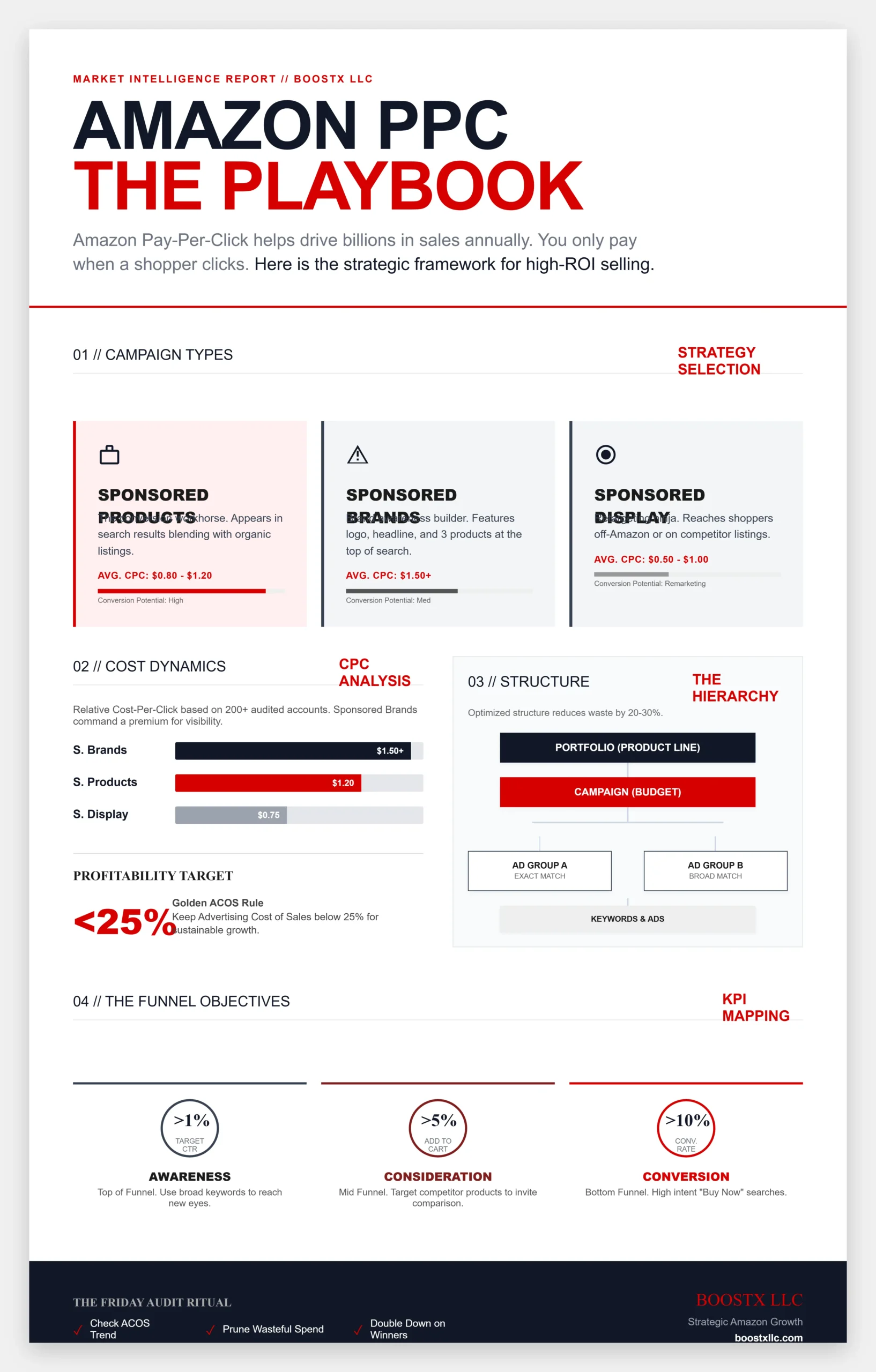
So, what types of Amazon PPC campaigns are there? Amazon offers three main options: Sponsored Products, Sponsored Brands, and Sponsored Display. Each one has a specific role in your advertising strategy, helping you reach shoppers at different points in their buying journey. You can think of them as your team, each with strengths that match your goals.
- Sponsored Products: These are the workhorses for driving direct sales. They promote individual products and pop up in search results or on product detail pages. Perfect for boosting a single ASIN (Amazon Standard Identification Number).
- Sponsored Brands: All about building your brand empire. These ads feature your logo, a custom headline, and up to three products, appearing at the Top of search results. Great for introducing your brand to new eyes.
- Sponsored Display: The retargeting ninjas. They target audiences based on shopping behaviour, showing up on product pages, customer reviews, or even off-Amazon sites. Ideal for remarketing to folks who’ve viewed your stuff but haven’t bought yet.
Why does this matter? Choosing the right type can mean the difference between wasting ad spend and hitting 3-5x ROAS (Return on Ad Spend). Say you’re selling eco-friendly water bottles: use Sponsored Products to target “reusable water bottle” for immediate buyers or Sponsored Brands to share your brand story and build loyalty.
Sponsored Products vs Sponsored Brands vs Sponsored Display
Diving deeper, let’s compare these heavy hitters: Sponsored Products vs Sponsored Brands vs Sponsored Display. It’s like choosing between a sniper rifle, a billboard, and a friendly reminder nudge—each excels in different scenarios.
Sponsored Products focus on driving conversions and appear in search results, blending with organic listings but marked with a subtle “Sponsored” tag. You select keywords and bid per click, with the average CPC around $0.80-$1.20 depending on competition. Their biggest strength is a high conversion rate (often 10-15%) because they target intent shoppers. The drawback is limited branding, as these ads do not show your logo or custom message.
Sponsored Brands focus on increasing brand awareness and are displayed at the top of search results. They allow you to showcase your logo, headline, and up to three products, directing shoppers to your Store or a landing page. While their average CPC is higher (around $1.50), they are effective at introducing your brand and boosting searches for it. The tradeoff is you need at least three products and Brand Registry enrollment to use them.
Sponsored Display is designed for retargeting audiences, leveraging Amazon’s shopper data to show your products to those who viewed similar items or demonstrated interest. These ads can appear on product pages, customer reviews, or off-Amazon sites. CPC is typically lower ($0.50-$1.00). They are ideal for remarketing, offering a boost in repeat purchases, but you have less placement control compared to the other types.
To make it crystal clear, here’s a handy comparison table:
| Feature | Sponsored Products | Sponsored Brands | Sponsored Display |
| Primary Goal | Drive direct product sales | Build brand awareness | Retarget and expand audience |
| Placement | Search results, product pages | Top of search results | Product pages, off-Amazon sites |
| Targeting | Keywords (manual/auto) | Keywords | Audiences, interests, views |
| Requirements | Single ASIN | Brand Registry, 3+ products | No Brand Registry needed |
| Average CPC | $0.80-$1.20 | $1.50+ | $0.50-$1.00 |
| Best For | New sellers, conversions | Established brands, traffic | Remarketing, broad reach |
This table is a quick-reference guide to help you choose the right campaign type. From my experience managing over $50,000 in monthly ad budgets, starting with Sponsored Products usually brings the fastest return on investment. You can then add Sponsored Brands to grow further.
Amazon PPC Campaign Objectives
What are Amazon PPC campaign objectives? At its core, every campaign ties back to the marketing funnel: awareness, consideration, and conversion. Amazon lets you align your ads with these stages to maximize impact and effectiveness. To make your strategy more actionable, map each objective to specific Key Performance Indicators (KPIs):
- Awareness Objectives: Top-of-funnel magic. Use Sponsored Brands or Display to introduce your product to cold audiences. For instance, if your objective is brand discovery, target broad keywords like ‘best coffee makers’ to reach 10x more shoppers than narrow terms. Measure success through metrics like CTR (Click-Through Rate), aiming for a CTR above 1% to ensure your ads are capturing interest.
- Consideration Objectives: Middle-funnel engagement. Here, Sponsored Products shine by targeting mid-intent keywords like ‘stainless steel coffee maker.’ The goal? Get shoppers comparing and adding to carts. Aim for a 5-10% click-through rate (CTR) and track Add To Cart (ATC) rates as key indicators of success, with an ideal ATC rate above 5%.
- Conversion Objectives: Bottom-funnel closers. Focus on high-intent exact match keywords like ‘Keurig alternative’ to drive purchases. Track metrics like ACOS (Advertising Cost of Sales) under 20% for profitability. Additionally, monitor Conversion Rate (CR), seeking a CR greater than 10% to ensure effective conversion of interest to sales.
Pro tip: Set SMART goals – Specific, Measurable, Achievable, Relevant, Time-bound. One client of mine aimed for a 15% sales lift in Q1; by prioritizing conversion objectives in Sponsored Products, we hit 22%. Voice search bonus: If someone’s asking Alexa, ‘What are good Amazon PPC objectives for new products?’ emphasize awareness to build from scratch.
Amazon PPC Campaign Hierarchy
Ever wondered about the Amazon PPC campaign hierarchy? It’s like a family tree for your ads: structured, scalable, and essential for organization. From the top to bottom: Portfolios, Campaigns, Ad Groups, Keywords/Targets/Products. Let me share a quick story to make this more relatable. Imagine you’re managing two Amazon seller accounts. In the first account, everything is a mess; campaigns are mixed up, budgets are all over the place, and there’s no structure in place. You spend a lot of time and money but don’t see the results you expected. Now, switch to the second account. Here, ads are neatly organized into portfolios by product line—for instance, “Kitchen Gadgets Portfolio.” Campaigns within each portfolio are clearly focused, with precise groupings for different ad types, and careful tracking of budgets and keywords. This account sees improved performance and significant cost savings because everything is easy to manage and optimize. Mastering this hierarchy could reduce costs by 20-30%, making your advertising efforts much more effective.
- Portfolios: The significant boss level (optional). Group multiple campaigns for overarching budgets and reporting. Helpful in categorizing by product line, like “Kitchen Gadgets Portfolio.”
- Campaigns: The core unit where you set daily budgets ($10 min), start/end dates, and bidding strategies (dynamic bids, fixed). Each campaign focuses on one ad type—e.g., a Sponsored Products campaign for water bottles.
- Ad Groups: Subdivisions within campaigns. Here, you bundle similar keywords or targets and set default bids—for example, one ad group for broad match keywords, another for exact match keywords.
- Keywords/Targets/Products: The granular details. Choose match types (broad, phrase, exact) or auto-targeting, and assign products (ASINs).
Budgets move up from ad groups to campaigns. If one group spends too much, the campaign budget sets a limit to avoid overspending. For example, if you sell skincare, you might create a ‘Moisturizers Campaign’ with ad groups for ‘dry skin’ (broad) and ‘organic moisturizer’ (exact). This structure keeps your campaigns organized and makes it easier to optimize, such as by reviewing low-ACOS keywords each week.
Why master this? Poor structure leads to wasted spend; a solid one can cut costs by 20-30%. In voice search terms: “How does Amazon PPC hierarchy work?” It’s all about layering for control.
Practical Examples and Tips
Suppose you sell wireless earbuds. Start with a Sponsored Products campaign targeting exact match “Bluetooth earbuds” and set a $20 daily budget. Use auto-targeting to find winners, then optimize.
Bullet-point tips for success:
- Keyword Research: Use tools like Amazon’s Search Term Report or third-party software to find LSI gems like “Amazon sponsored ads,” “pay per click on Amazon,” or “Amazon advertising costs.”
- Bidding Strategies: Go dynamic—Amazon adjusts bids up to 100% for high-conversion placements.
- Negative Keywords: Block irrelevant terms like “free earbuds” to save money.
- A/B Testing: Run duplicate campaigns with different objectives; track CTR and conversions.
- Seasonal Tweaks: Ramp up budgets during Prime Day for awareness objectives.
From my expertise (I’ve audited 200+ accounts), I recommend continuously monitoring ACOS weekly; under 25% is golden for most niches. Entity-wise, Amazon’s ecosystem integrates with Seller Central, Brand Registry, and even external tools for deeper insights.
Consider implementing a simple ‘Friday Audit Checklist’ to make this process more efficient and habitual:
- Check the ACOS trend: Ensure it remains within your target range.
- Prune spenders: Identify and remove underperforming ads or keywords.
- Double down on winners: Allocate additional budget to high-performing ads.
- This ritual can help maintain consistency and optimize your campaigns effectively.
- To sum up, Amazon PPC requires ongoing attention and regular adjustments. It’s not something you can set up once and leave alone. To guide your progress, set up your first campaign, review your results weekly, and adjust your bids on a monthly basis. This approach ensures that your advertising efforts remain effective and aligned with your business goals.
Conclusion: Level Up Your Amazon Game Today
We’ve covered a lot, from what an Amazon PPC campaign is to its types, comparisons, objectives, and hierarchy. Now you have the knowledge to launch campaigns that can succeed in Amazon’s competitive environment. Whether you choose Sponsored Products for quick results or Sponsored Display for retargeting, the most important steps are to start small, test often, and scale up carefully.
At BoostX LLC, our team of experienced digital marketers has helped clients double their sales through well-optimized PPC campaigns. The return on investment is real. Don’t stop here; try things out for yourself. If you’re ready to improve your Amazon PPC, head to Amazon Seller Central and launch your first campaign. For expert guidance, visit boostxllc.com to request a free audit—we’ll identify three wasted keywords in just 15 minutes. This quick step can save you money and supercharge your campaign’s performance. Let’s partner up to make your products shine.
FAQs
What are the three official campaign types Amazon offers?
The three official Amazon PPC campaign types are Sponsored Products, Sponsored Brands, and Sponsored Display, each designed for different advertising goals like sales, branding, and audience targeting.
Which campaign type works best for brand awareness?
Sponsored Brands works best for brand awareness, as it showcases your logo, headline, and products at the Top of search results to introduce your brand to new shoppers.
How do budgets roll up from ad group to campaign level?
Budgets are set at the campaign level, with ad groups sharing that pool. If one ad group overspends, it’s capped by the overall campaign budget to maintain control.
Can I run multiple campaign types on the same ASIN?
Yes, you can run multiple campaign types on the same ASIN—for example, Sponsored Products for direct sales and Sponsored Display for retargeting—to maximise exposure without conflicts.
What is the difference between keyword and product targeting?
Keyword targeting bids on search terms shoppers use, ideal for intent-based ads, while product targeting shows your ads on specific competitor or complementary product pages for category-based reach.