Hey there, ambitious Amazon seller! Imagine this: You’re scrolling through Amazon, searching for that perfect gadget, and bam—sponsored ads pop up, grabbing your attention and leading straight to a sale. Ever wondered how those ads get there and, more importantly, how you can make them work for your products? If you’re nodding along, you’re in the right place. Today, we’re diving deep into “how does Amazon PPC work,” unpacking everything from the basics to advanced strategies. Whether you’re a newbie launching your first campaign or a seasoned pro tweaking your ads, this guide will arm you with the knowledge to turn clicks into cash. Let’s get started—your Amazon success story awaits!
What Is Amazon PPC and Why Should You Care?
Amazon PPC, or Pay-Per-Click advertising, is Amazon’s powerhouse ad platform that lets sellers like you promote products directly to shoppers. Unlike traditional ads, where you pay upfront, PPC means you only pay when someone clicks on your ad. It’s a game-changer for boosting visibility, driving traffic, and skyrocketing sales in a marketplace crowded with millions of products.
Think of it as renting prime real estate on Amazon’s search results page. Sponsored Products, Sponsored Brands, and Sponsored Display ads are the main players here, each designed to catch eyes at different stages of the buyer’s journey. For instance, Sponsored Products appear in search results and on product detail pages, mimicking organic listings to blend seamlessly. Why care? Well, with over 300 million active customers on Amazon, PPC can help you cut through the noise and reach buyers actively searching for items like yours. Plus, it’s scalable—start small with a $10 daily budget and grow as you see results.
But here’s the exciting part: Amazon PPC isn’t just about spending money; it’s about smart spending. By targeting relevant keywords, you can achieve a healthy Advertising Cost of Sales (ACoS), ensuring your ad spend translates to profitable returns. Ready to see how it all clicks together? Let’s break it down.
Amazon PPC Auction Explained: The Heart of the System
Curious about the amazon ppc auction explained? It’s like a high-stakes game where sellers bid for ad spots, but with a twist that keeps things fair and efficient. Amazon runs a second-price auction model for PPC ads. Here’s how it shakes out: When a shopper searches for a keyword you’ve targeted, Amazon instantly auctions off the ad placements among eligible advertisers.
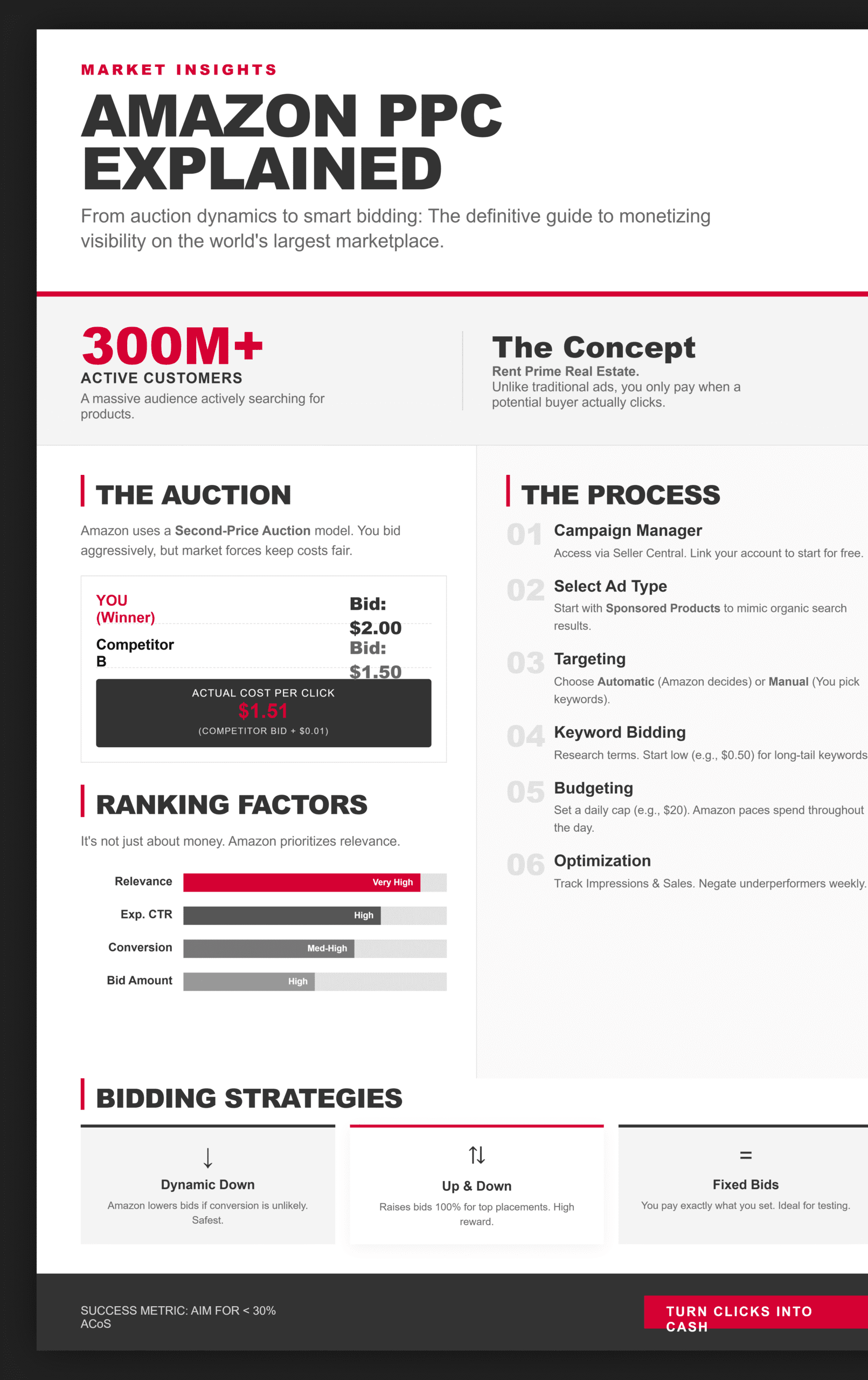
You set a maximum bid—the most you’re willing to pay per click. But you don’t pay your full bid if you win. Instead, you pay just one cent more than the second-highest bidder. For example, if you bid $2.00 and the next bidder offers $1.50, you pay $1.51 per click. This encourages aggressive bidding without overpaying.
What makes it even cooler? Relevance plays a huge role. Amazon doesn’t just hand the win to the highest bidder; it factors in your ad’s quality score, based on click-through rates (CTR), conversion rates, and how well your product matches the search query. A highly relevant ad with a lower bid can outrank a high-bid, low-relevance one. Practical tip: If you’re selling eco-friendly water bottles, bid on keywords like “reusable water bottle” and ensure your listing has stellar images and reviews to boost that relevance score.
This auction happens in milliseconds, every time a search occurs, making Amazon PPC dynamic and competitive. Master this, and you’ll see your ads dominating top spots without breaking the bank.
Step-by-Step Amazon PPC Process: From Setup to Success
Setting up your first campaign? Don’t sweat it—here’s a step-by-step amazon ppc process to get you rolling like a pro.
- Step 1: Sign Up and Access Campaign Manager. Head to Amazon Seller Central, navigate to the Advertising tab, and click on Campaign Manager. If you’re new, link your seller account—it’s free to start.
- Step 2: Choose Your Ad Type. Pick from Sponsored Products (product-focused), Sponsored Brands (brand awareness with logos), or Sponsored Display (retargeting off-Amazon). For beginners, start with Sponsored Products—they’re straightforward and effective.
- Step 3: Set Targeting Options. Go automatic (Amazon chooses keywords based on your listing) or manual (you select specific keywords). Use tools like Amazon’s search term report for insights.
- Step 4: Keyword Research and Bidding. Research high-volume, relevant keywords using Amazon’s suggestions or third-party tools. Set bids based on competition—start low, like $0.50 for long-tail keywords, and adjust.
- Step 5: Define Budget and Duration. Set a daily budget (e.g., $20) and campaign start/end dates. Amazon won’t exceed your daily cap, but monitor for pacing.
- Step 6: Launch and Optimise. Hit go, then track metrics like impressions, clicks, and sales. Tweak bids weekly based on performance—negate underperformers to save cash.
Take Sarah, a fictional seller of handmade candles. She launched a Sponsored Products campaign targeting “scented soy candles,” with a $15 daily budget. Within a week, she saw 200 clicks, 15 sales, and refined her keywords to focus on high-converters. Simple. Follow these steps, and you’ll be optimising in no time.
Amazon PPC Ad Ranking Factors: What Determines Visibility?
Ever asked, “What influences my ad’s position?” Let’s unpack the amazon ppc ad ranking factors that decide who gets the spotlight.
Amazon’s algorithm weighs several elements to rank ads:
- Bid Amount: Higher bids increase chances, but they’re not everything.
- Relevance Score: How well your ad matches the search. Factors include keyword match, listing quality, and historical performance.
- Expected CTR: Based on past data, Amazon predicts the likelihood of users clicking your ad.
- Conversion Rate: Ads that lead to sales rank higher—optimise your product page with compelling descriptions and reviews.
- Account Health: Overall seller metrics like order defect rate play a subtle role.
For example, if two sellers bid on “wireless earbuds,” the one with a 10% conversion rate and strong reviews will outrank a higher bidder with poor relevance. Focus on these factors to climb the ranks without endless bid wars.
| Factor | Description | Impact on Ranking |
| Bid Amount | Your max CPC bid | High |
| Relevance Score | Match between keyword, ad, and product | Very High |
| Expected CTR | Predicted click rate from historical data | High |
| Conversion Rate | Percentage of clicks turning into sales | Medium-High |
| Ad Quality | Creative elements like images and titles | Medium |
Amazon PPC Bid and Budget Flow: Managing Your Spend Smartly
Navigating amazon ppc bid and budget flow is key to avoiding budget burnout while maximising ROI. Your daily budget caps total spend per campaign—Amazon paces it throughout the day, but high-traffic periods might exhaust it early.
Bidding strategies add flexibility:
- Dynamic Bids (Down Only): Amazon lowers your bid in low-conversion scenarios to save money.
- Dynamic Bids (Up and Down): Increases bids up to 100% for high-conversion placements like top of search.
- Fixed Bids: You control the exact amount, ideal for testing.
Budget flow works like this: Set $50 daily; Amazon charges per click until the budget is hit, then pauses ads until tomorrow. If underspent, it can carry over slightly.
Real-world example: John sets a $100 budget for his tech gadgets campaign. With dynamic up/down bids, Amazon boosts bids for mobile searches (higher conversions), leading to 300 clicks and $80 spent profitably. Monitor via reports—adjust bids down for high-ACoS keywords to keep the flow efficient.
Incorporate LSI terms like “cost-per-click bidding,” “ad impressions,” and “keyword targeting” naturally to enhance SEO and voice search compatibility, such as “Hey Alexa, explain Amazon PPC bidding.”
Overcoming Common Challenges in Amazon PPC
No journey’s perfect—new campaigns enter a “learning phase” where Amazon gathers data, often taking 2-4 weeks to stabilise. During this, expect fluctuating performance. Combat it with broad targeting initially, then refine.
Bullet-proof your strategy:
- Track ACoS religiously—aim for under 30% for profitability.
- Use negative keywords to block irrelevant searches.
- Test ad creatives: Swap images to boost CTR.
- Scale winners: Increase budgets on high-performers.
By addressing these, you’ll turn PPC into a reliable sales engine.
Wrapping It Up: Take Action and Watch Your Sales Soar
Whew, we’ve covered a lot—from demystifying how Amazon PPC works to mastering auctions, steps, rankings, and budgets. Remember, Amazon PPC is your ticket to standing out in a sea of products, blending smart bidding with relevance to drive real results. Whether you’re aiming for quick wins or long-term growth, the key is starting small, testing relentlessly, and optimising based on data.
Ready to put this into practice? Head to Seller Central now, launch your first campaign, and watch the magic happen. If you need expert help or tools to streamline, check out resources like Jungle Scout or sign up for our newsletter for more tips. Your Amazon empire is just a click away—make it happen! you can check our service
5 FAQs
How does Amazon’s second-price auction work?
In Amazon’s second-price auction, you bid your maximum CPC, but if you win, you pay only $0.01 more than the second-highest bid. This system rewards efficient bidding while incorporating relevance to ensure fair play.
What are the three key ad placements in Amazon PPC?
The main placements are top of search (prime real estate above organic results), rest of search (scattered throughout results), and product detail pages (appearing on competitor listings to capture intent).
How does Amazon decide which ad wins the auction?
Amazon weighs your bid against ad relevance, expected CTR, and conversion potential. The highest “effective bid” (bid times quality score) wins the spot.
What is the relationship between CPC bid and relevancy score?
A higher relevancy score (from strong CTR and conversions) can help lower bids win auctions, as Amazon prioritises user experience. It’s a balance—boost relevance to reduce effective CPC.
How long does it take for a new campaign to exit the “learning” phase?
Typically, 2-4 weeks, during which Amazon collects data on performance. Patience is key; avoid major changes early to let the algorithm optimise.