
Every click could eat into your profits if you fall into these five traps. Amazon’s ad platform offers great potential but can quickly drain your budget. With 8 years as an Amazon PPC consultant, I’ve helped sellers save thousands by avoiding wasted spend. In this post, I’ll walk you through five common Amazon PPC mistakes that can hurt your profits, raise ACOS, and lower ROI.
Picture this: you launch a Sponsored Products campaign, set bids, add keywords, and nothing happens. Or worse, you get lots of clicks but no sales, and your budget disappears. If this sounds familiar, you’re not alone. I’ll explain these five costly mistakes, share campaign examples, and give practical tips to improve your Amazon ads. Let’s get started.
Understanding Amazon PPC and Its Costly Mistakes
Amazon PPC is a pay-per-click model where sellers bid on keywords to display ads like Sponsored Products, Brands, or Display. The A10 algorithm prioritizes relevant, high-performing listings. With 350 million products on Amazon, competition is fierce. A single error can inflate costs 20-50%, turning profits into losses. For example, a $10,000 monthly budget could waste $2,000 to $5,000. The average ACOS is 30%, but poor management can push it to 50% or more, costing thousands. These errors are fixable—let’s uncover the top five.
Amazon PPC Mistake #1: Ignoring Negative Keywords
A major mistake is ignoring negative keywords—terms you tell Amazon not to show your ads for, preventing irrelevant clicks. Without them, your ads might appear for searches like “free widgets” when selling premium ones, racking up costs with no sales.
Example: Sarah, selling eco-friendly water bottles, used the broad match keyword “water bottle.” Her ads showed for “baby water bottle” and “hot water bottle warmer”—irrelevant terms. She wasted $500/month on junk traffic. Adding negatives like “baby,” “hot,” and “warmer” dropped her ACOS from 45% to 25%, saving $3,000 in a quarter.
Negative keywords target high-intent buyers, boosting click-through rates (CTR) and campaign health.
How to Fix This Amazon Advertising Error
- Audit your search terms report weekly in Seller Central (Campaigns > Advertising Reports > Search Term Report). Follow the ‘three-click rule’: download the report, filter for terms with spend but zero sales, and immediately add these as negative keywords. Identify low-converting terms and add them as negatives without delay. Set reminders and dedicate time each week to review and optimize your campaigns. Prioritize these actions to keep campaigns optimized and improve results.
- Use phrase and exact match negatives for broader control, e.g., “free shipping” if that’s not your offer.
- Start with auto campaigns for keyword discovery, then negate poor performers in manual campaigns.
- Consider tools like Helium 10 or Sellics for advanced damaging keyword harvesting. Beginners can use Helium 10, which offers intuitive features and is easy to learn. More advanced sellers should use Sellics for robust analytics and AI-driven optimisation to manage complex campaigns efficiently.
Pro Tip: For voice searches like “Best water bottles for hiking,” exclude unrelated outdoor gear to focus on your niche. This can boost ROI by 15-30%.
Amazon PPC Mistake #2: Weak Keyword Research
Keyword research is vital for Amazon PPC success, but many sellers don’t spend enough time on it. Using generic or low-intent keywords shows your ads for searches that don’t lead to sales, wasting your budget. You might get interest, but not from the right customers.
Example: Mike sold wireless earbuds and bid heavily on “earbuds.” His ads appeared for “wired earbuds” and “earbud cleaners.” This yielded a 10% conversion rate and wasted $2,000 monthly. Comparing keyword intent makes this clearer: High-Intent Keywords: “noise-cancelling wireless earbuds for running”, “bluetooth earbuds for sports” Low-Intent Keywords: “earbuds”, “cheap earbud cleaners”
Switching to long-tail keywords like “noise-cancelling wireless earbuds for running” boosted conversions to 25% and cut ACOS below 20%.
Practical Tips to Improve Your Amazon PPC Keyword Strategy
- Use Amazon’s Keyword Planner in Seller Central or search your product for suggested terms.
- Incorporate long-tail keywords for lower competition and higher intent, e.g., “best budget wireless earbuds under $50.”
- Spy on competitors’ ads with tools like Jungle Scout to find winning keywords.
- Use match types strategically: broad for discovery, phrase for mid-funnel, exact for bottom-funnel.
For voice queries like “What are good keywords for Amazon PPC?”, focus on natural, buyer-intent phrases.
Amazon PPC Mistake #3: Overlooking ACOS and ROI Metrics
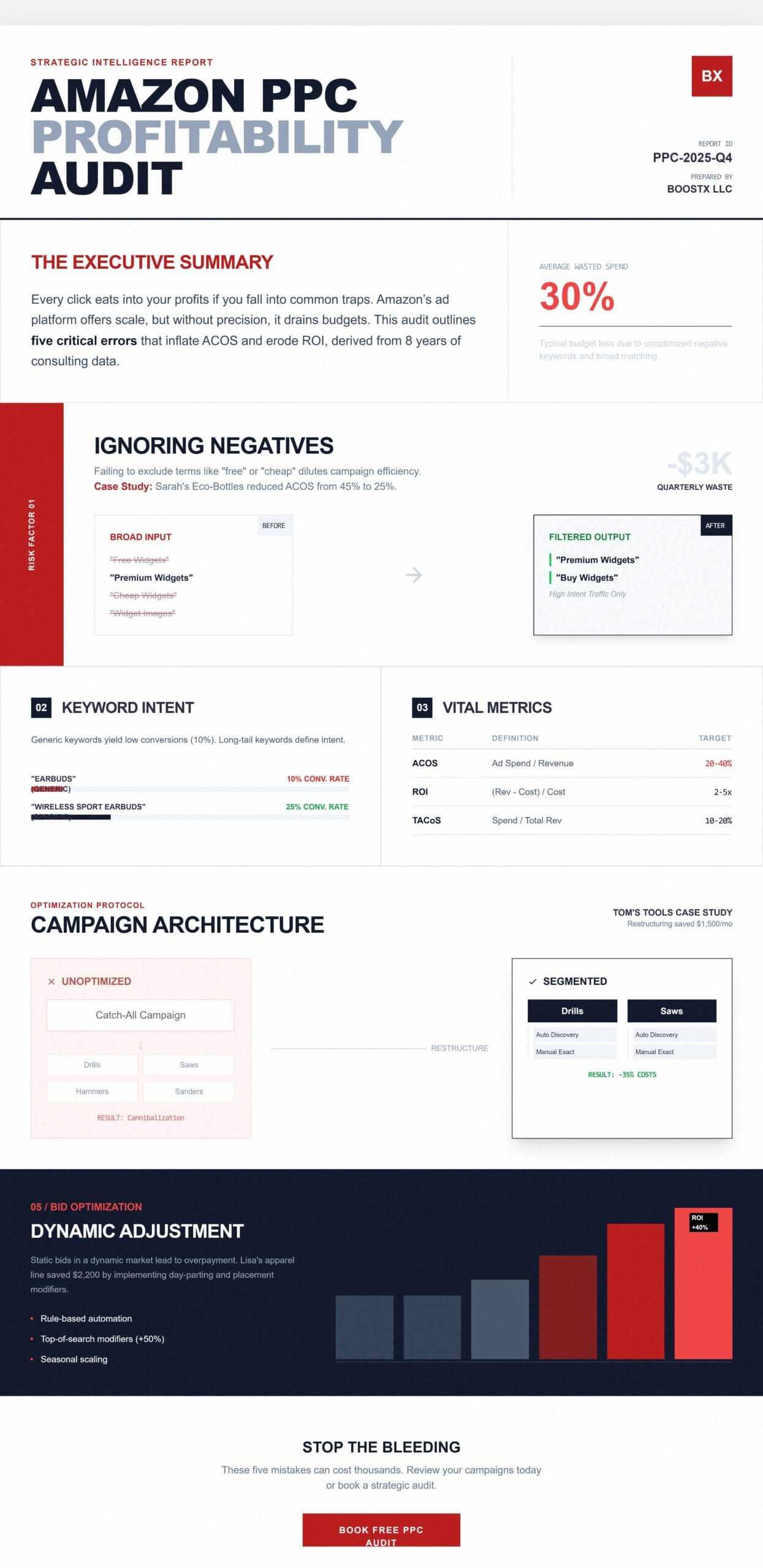
If you focus only on impressions or clicks and ignore ACOS, ROI, or TACoS (Total Advertising Cost of Sales), you could be wasting money. ACOS shows how much you spend on ads compared to your sales. For example, a 30% ACOS means you spend $0.30 for every $1 you earn. To prevent overspending, first calculate your breakeven ACOS based on your product margins. A simple margin worksheet helps you pick the best ACOS for your business. Use the 20-40% benchmark in a way that fits your goals.
Example: A beauty brand I worked with had a 60% ACOS, losing $4,000/month, chasing top-of-search placement. Setting ACOS targets (20-40% based on margins) and pausing high-ACOS keywords turned it profitable.
How to Monitor and Optimise Amazon PPC Metrics
- Set benchmarks: New products can tolerate higher ACOS (50%) for visibility; mature ones should aim for under 30%.
- Use rules-based bidding to automate bid adjustments based on ACOS.
- Track ROI: (Revenue – Ad Spend – COGS) / Ad Spend.
- Review weekly dashboards to spot trends.
Here’s a quick metrics table:
| Metric | Definition | Ideal Range | Why It Matters |
| ACOS | Ad spend / Ad revenue | 20-40% | Measures profitability per ad dollar |
| ROI | (Revenue – Costs) / Costs | 2-5x | Overall return on investment |
| CTR | Clicks / Impressions | 0.5-2% | Indicates ad relevance |
| TACoS | Ad spend / Total revenue | 10-20% | Shows ad impact on all sales |
| Conversion Rate | Sales / Clicks | 10-20% | Efficiency of traffic to sales |
Amazon PPC Mistake #4: Poor Campaign Structure
Disorganised campaigns cause higher costs. Mixing broad and exact match types or lumping all products together leads to keyword cannibalization.
Example: Tom’s tool brand had one campaign for all SKUs, causing internal bidding wars. Clicks cost $1.50 on average with low conversions. Restructuring into product-specific campaigns (e.g., drills, saws) with auto, manual, and brand defence types cut costs by 35%, saving $1,500/month.
Building a Solid Amazon PPC Campaign Structure
- Segment by product category: Separate high-margin from low-margin items.
- Use campaign types: Auto for discovery, manual for control.
- Create ad groups for similar keywords/ASINs.
- Allocate about 60% of your budget to proven campaigns and 40% to testing new ideas. As your business grows, shift more money to what works and less to testing. If you launch new products, increase spend on testing at first. Regularly review and adjust your budget to match your goals and the market. Act now to keep your business growing.
For voice searches like “How to structure Amazon PPC campaigns,” think funnel-based to avoid overlap.
Amazon PPC Mistake #5: Neglecting Bid Optimisation
Static bids in a dynamic market lead to overpaying for placements like top-of-search or product pages.
Example: Lisa’s apparel line had static bids, costing $2,200 extra as competitors undercut her. Dynamic bidding—raising for high-converters, lowering for laggards—improved ROI by 40%.
Strategies for Amazon Bid Optimisation
- Try rule-based automation. Increase bids by 20% for keywords performing well under your target ACOS. Run a simple seven-day A/B test by setting different bid levels for the same keyword in two similar campaigns, and compare the results. This experiment can show you how dynamic bidding affects your campaign.
- Adjust placement modifiers: Boost top-of-search by 50% if it converts well.
- Tweak for seasonality, e.g., ramp up for Prime Day.
- A/B test bid levels on duplicate campaigns.
For voice queries like “How to optimise bids on Amazon PPC?”, use data, not gut feel.
Best Practices for Amazon PPC Optimisation
- Integrate PPC with organic SEO for better ad performance.
- Test continuously: Allocate 10-20% of the budget to experiments.
- Use Amazon Brand Analytics for insights.
- Stay updated on Amazon’s policy changes via blogs and forums.
Take Action to Fix Your Amazon PPC Campaigns
These five mistakes—ignoring negative keywords, weak keyword research, overlooking key metrics, poor campaign structure, and neglecting bid adjustments—can cost you thousands. Short on time? Fix negative keywords now to quickly cut wasted ad spend. Lower your ACOS and boost ROI by correcting these issues. Review your campaigns today or book your free PPC audit at Boostxllc.com and start eliminating costly problems.
FAQs
What is the most common Amazon PPC mistake?
Neglecting negative keywords is by far the most common issue. It allows your ads to appear for irrelevant searches and leads to wasted clicks and inflated costs without conversions. For example, if you sell premium gadgets, your ads might show for “cheap gadgets” or “free gadgets,” draining your budget. To fix this, add negative keywords in your campaign settings via Amazon Seller Central. Review your search term reports weekly to identify and exclude low performers. This refines targeting and improves campaign efficiency. In many cases, ACOS drops by 10-20%. If you manage many campaigns, consider tools like Helium 10 for automated suggestions.
How can I lower my ACOS on Amazon?
Lowering ACOS takes several steps. Start with in-depth keyword research to target high-intent, long-tail terms. These convert better. Next, optimize your bids with performance data, and regularly check key metrics like conversion rates. Pause keywords with ACOS over your target (e.g., 30-40% for most products) and shift budget to top performers. Add negative keywords to remove irrelevant traffic. Try different match types (broad vs. exact) to fine-tune your ad reach. Improve your product listings with better images and descriptions to boost conversions and lower ACOS. Track your progress weekly using Seller Central dashboards. New sellers should aim for gradual ACOS reductions. Many see 15-30% improvements within a month by combining these tactics.
Should I use auto or manual campaigns for Amazon PPC?
It depends on your goals and experience, but a hybrid approach often works best. Start with automatic campaigns. Amazon’s algorithm then discovers relevant keywords and gathers performance data, which is helpful for new products with no history. Once you find winners (high-conversion search terms), move them to manual campaigns. You then gain precise control over bids, match types, and targeting. This allows for efficient scaling and minimizes risks. Auto is good for broad discovery and can uncover many keywords. Manual campaigns offer better optimisation and ROI. In competitive niches, test both and allocate budgets accordingly, for example, 30% to auto for ongoing discovery.
What tools help with Amazon PPC optimisation?
Several tools can streamline Amazon PPC optimisation beyond basic Seller Central features. Amazon’s own reports (like search term and placement reports) are essential for free insights, but third-party options like Helium 10 offer advanced keyword research, damaging keyword harvesting, and ACOS tracking with automation features. Jungle Scout is excellent for competitor analysis and bid suggestions, while Sellics (now Perpetua) provides AI-driven bid adjustments and campaign structuring. For budgeting, consider free alternatives like Google Sheets for custom dashboards, or paid ones like PPC Entourage for bulk edits. Choose based on your scale—beginners might stick to Seller Central plus one tool, while advanced sellers integrate multiple for comprehensive data. Always cross-reference with real campaign performance to avoid over-reliance.
How often should I review my Amazon ad campaigns?
Regular reviews are crucial to catch issues early and adapt to changes like seasonality or competition shifts. Aim for weekly checks on core metrics such as ACOS, CTR, and conversion rates to make quick tweaks like pausing underperformers or adjusting bids—this prevents minor problems from escalating into significant losses. Conduct a full audit monthly, including restructuring campaigns, harvesting new negatives, and analysing trends via reports or tools like Amazon Brand Analytics. For high-volume sellers, daily spot checks on top campaigns might be needed, especially during events like Prime Day. Consistency is key; set reminders or use automation rules in Seller Central to flag anomalies, ensuring your PPC stays profitable over time without constant manual oversight.