Meet Maria, owner of Bean & Bloom Café. Her cozy café was getting lost in the shuffle of Google Search and Maps. Customers searching ‘coffee shop near me’ would find chains across town, while Maria’s business went unnoticed. The secret to flipping her script? Mastering her Google Business Profile (formerly Google My Business). In 2025, an optimized profile can boost clicks by 70% and drive 42% more directions requests, translating to real revenue.
Whether you’re a café owner like Maria or in another field, these 10 hacks will help you dominate local SEO, attract more customers, and own your spot on Google Maps. Let’s get started!
Hack #1: Claim and Verify Your Profile Like a Pro
Your Google Business Profile is your digital storefront. Unclaimed? You’re handing control to Google or random editors. Have you checked if your profile is verified yet?
Go to business.google.com and look up your business. If you don’t see it, click ‘Add your business’ and fill in the details. Once it shows up, claim it. You can verify your business by postcard, phone, or email. If you use Google Search Console, instant verification might be available. For example, a bakery in Seattle verified their profile and soon saw 50% more ‘bakery near me’ searches.
- Ensure NAP consistency: Match your Name, Address, Phone across all platforms (website, Yelp, etc.).
- Add attributes: Highlight “free Wi-Fi” or “wheelchair accessible” for specific searches.
- Voice search tip: Accurate NAP helps queries like “find a bakery open now in Seattle.”
Why not verify your profile today? Claiming and verifying your business helps you get noticed right away. Make sure your business name, address, and phone number are the same everywhere online. If you run into problems, check that your details match on all platforms. If your postcard doesn’t arrive, contact Google support. For phone or email issues, double-check your contact info. Follow these steps to make the process easier.
Hack #2: Complete Every Section with Keyword Magic
Google likes profiles with lots of details. Fill out every section, including categories, description, and hours, to show you’re an expert and can be trusted. Is there anything missing from your profile?
Choose a primary category (e.g., “Coffee Shop”) and secondary ones (e.g., “Bakery”). Write a 750-character description with keywords like “best local coffee roasters” or “cozy café for remote work.” An Austin gym added “group fitness classes” and ranked #1 for “gyms near me,” boosting sign-ups by 30% (Google Small Business, 2024).
- Update hours: Include holiday specials to avoid bad reviews.
- List services/products: Add prices and descriptions for direct conversions.
- LSI keywords: Use “local business listing optimization” or “Google Maps ranking tips.”
How could a keyword-rich description change your visibility?
Hack #3: Wow with Photos and Videos
Photos drive action; profiles with visuals get 42% more directions requests. Upload 10-15 high-res images: storefront, interior, products, team. What images could showcase your business’s vibe?
Quick Win Checklist:
– Storefront Shot
– Team Photo
– 360-Degree Tour
Geo-tag photos for local relevance and add 360-degree tours via Google’s Street View app. A Chicago restaurant’s food pics and video tour spiked “Italian restaurant near me” searches, lifting reservations by 25%.
- Optimize images: Use alt text like “fresh pasta in Chicago.”
- Encourage user photos: Boost social proof.
- Video power: Short clips for “authentic dining experiences” voice searches.
Hack #4: Turn Reviews into Ranking Gold
Reviews are SEO fuel—100+ reviews with 4+ stars push you into the Map Pack. How many reviews does your business have?
Use QR codes on receipts or emails to make reviews easy. Implement a templated post-service email sequence to encourage reviews, saving time and maintaining regular requests. This ‘Review Relay’ process can automate the flow of reviews and allow business owners to focus on other pressing tasks. A Miami plumber responded to all reviews within 24 hours, hitting 4.8 stars and topping “plumber near me” searches.
- Solicit smartly: Post-service emails or in-store signage.
- Respond fast: Thank positives, address negatives professionally.
- Voice search boost: Reviews with “fast service” help queries like “top-rated plumbers open now.”
What’s one way you can encourage more reviews?
Hack #5: Post Weekly for Freshness
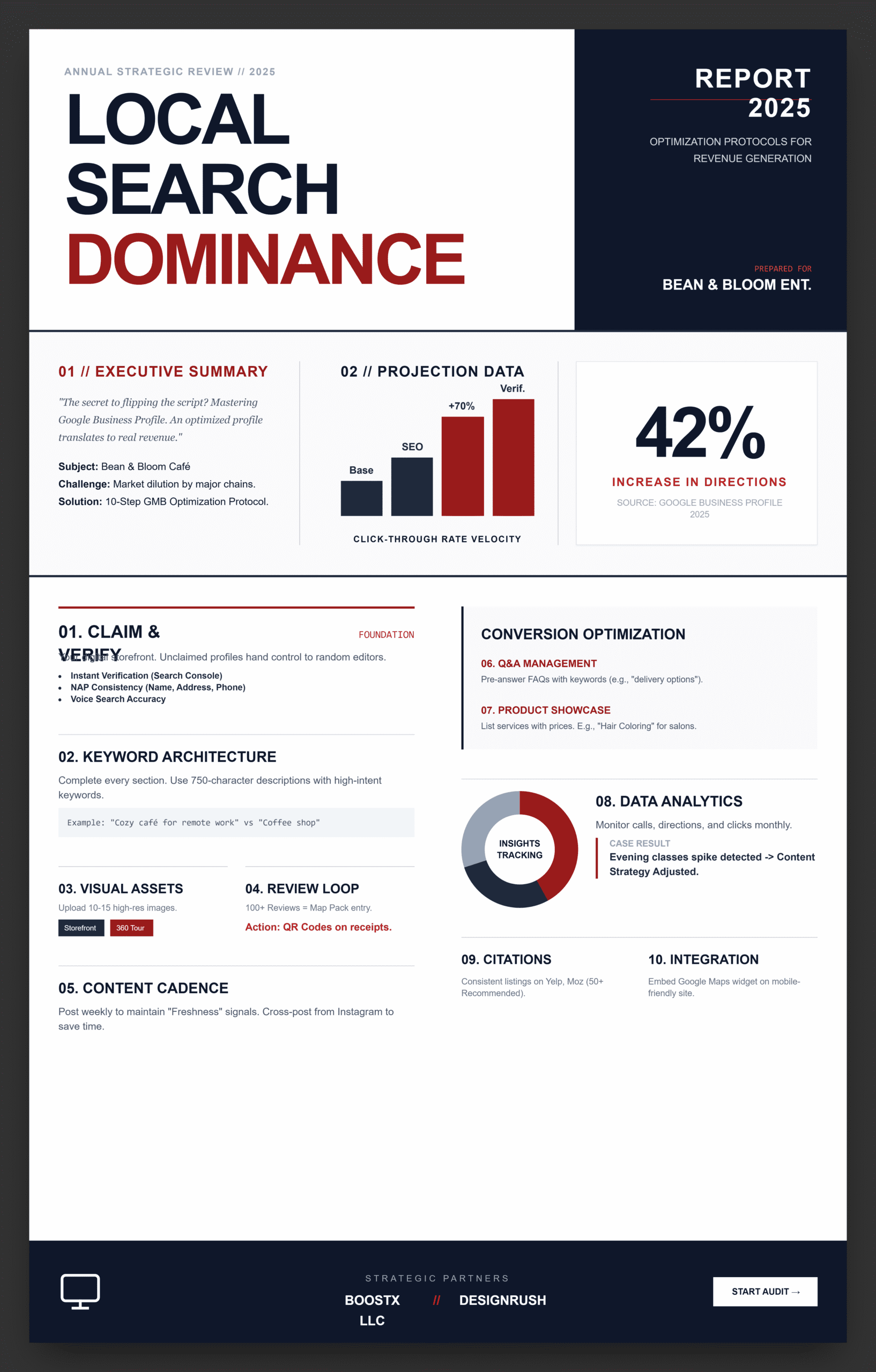
Posting on Google keeps your profile active and can boost weekly engagement by 20%. Try reusing content you already have, like today’s Instagram photo, to make posting easier. Spend just 10 minutes each week cross-posting to stay consistent. Share offers, events, or news with clear calls to action like ‘Book now.’ What could you post this week?
A New York boutique’s “fall fashion tips” posts drove 40% more traffic for “trendy clothing stores near me.”
- Mix post types: Offers, updates, events.
- Add media: Images or videos for clicks.
- Voice optimization: Use titles like “Best deals on women’s apparel?”
Hack #6: Master Q&A and Messaging
The Q&A section answers customer queries before they ask, boosting relevance. What questions do your customers frequently ask?
Pre-answer with keywords like “delivery options for local orders.” Enable messaging for real-time chats. A Denver auto shop’s Q&A for “oil change costs” improved “affordable car maintenance near me” rankings.
- Monitor Q&A: Flag irrelevant questions.
- Sync with FAQs: Pull from your website.
- Build trust: Quick replies show expertise.
Hack #7: Showcase Products and Services
List products/services with prices and images for an e-commerce boost. What offerings could you highlight?
An LA salon added “hair coloring services” with photos, attracting “best hair salons near me” traffic.
- Organize clearly: Group for easy browsing.
- Update seasonally: Stay relevant.
- LSI terms: Use “professional beauty treatments.”
Hack #8: Track Insights for Smarter Moves
Google’s analytics show you how people find and interact with your business. Watch for calls, directions, and clicks to see what’s working. Try checking these numbers every week to track your progress. Setting aside time each Monday to review your stats can help you stay on top of things and improve over time. How often do you look at your profile’s insights?
A gym noticed “evening classes” search spikes and updated posts, boosting engagement.
- Monitor metrics: Calls, directions, clicks.
- A/B test: Try new descriptions or photos.
- Competitor analysis: Use Google Search for ideas.
Hack #9: Build Citations for Authority
Consistent citations on Yelp or Moz Local (50+ recommended) strengthen trust. Where is your business listed online?
A Boston dentist added citations, climbing “dentist near me” rankings.
- Use tools: Moz Local or BrightLocal.
- Voice search: Citations with natural keywords help.
- EEAT boost: Links from high-DA sites.
Hack #10: Integrate with Your Website
Embed your Google Maps widget on your site and ensure mobile-friendliness. Does your website link to your GMB profile?
A real estate agency did this, boosting “homes for sale near me” inquiries.
Optimization Checklist
Task Basic Advanced
Claim & Verify Yes Instant verification
Complete Profile NAP & Hours Description, Attributes
Photos & Videos 5+ Images Geo-tagged, 360 Tours
Reviews Respond to All QR Codes, 100+ Reviews
Posts Weekly CTAs & Keywords
Q&A Optimization Answer 5+ Preemptive with LSI
Insights Monitoring Monthly Weekly Adjustments
Citations 20+ 50+ High-DA
Voice Search, Natural Keywords, Conversational Posts
Website Integration Embed Map Schema Markup
Which task will you tackle first?
Take Over Local Search in 2025
These 10 hacks, from claiming your profile to posting weekly, give you the edge to dominate Google Search and Maps. Start with a small step: snap a photo of your storefront and upload it to your Google Business Profile. This simple action can dramatically increase your visibility. Your customers are searching, so make sure they find you.To find reputable marketing partners and verified agency reviews, platforms like DesignRush can be a valuable resource
Ready to supercharge your local SEO? Choose the clear path to success by visiting business.google.com to get started on your own journey. For expert guidance and a free consultation, consider reaching out to BoostX LLC for a personalized approach. If you prefer a completely DIY method, explore free resources like Google’s support center or SEO-focused forums for quick tips and community advice.
What will you do next to improve your local SEO? Let’s get started—reach out to us today!
FAQs
What’s Google My Business?
A free tool to manage your business on Google Search and Maps, driving local traffic.
How do I claim my listing?
Visit business.google.com, search your business, and verify via postcard, phone, or email.
How can I get more reviews?
Use QR codes, emails, or signage; respond promptly to build trust.
How does voice search optimization work?
Add conversational keywords like “best coffee shop open now” to match Siri/Google Assistant queries.
Do posts help SEO?
Yes, weekly posts with keywords and media boost visibility and engagement.